THE CLIPPED / AI STUDIO FOR MAC
Your next video.
Made on your Mac.
AI Studio produces short-form and long-form videos on your Mac. Generate motion graphics and AI narration, shape the edit and render the finished video.
Join the waitlist ↗ Get release details, pricing and purchase access.
See what AI Studio can make ↗
The actual AI Studio app. Built for Mac.
ONE PROJECT, IN VIEW
A video editor for Mac.
With room to direct.
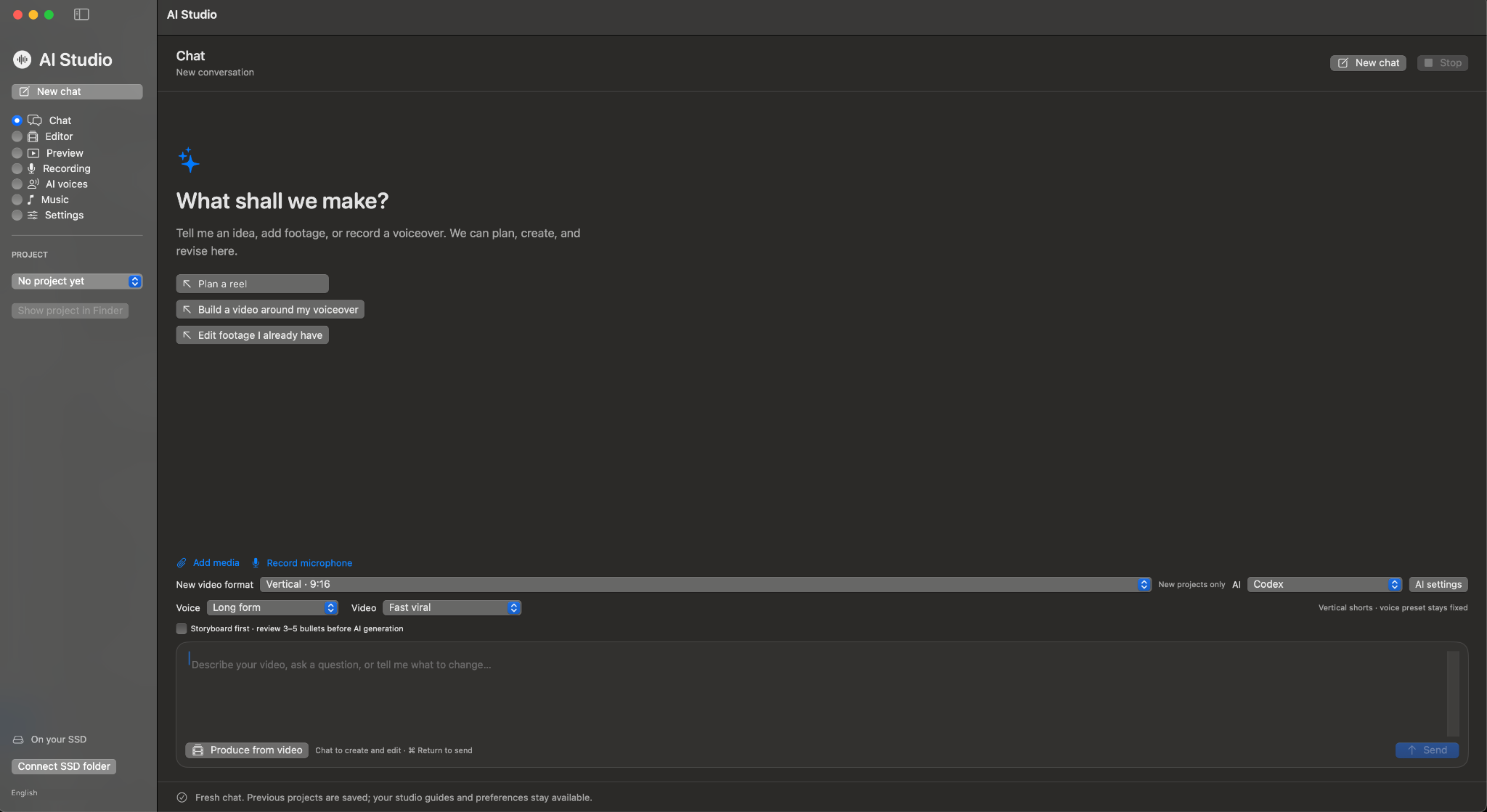
Start with the material you have. Add a clip, record your microphone or describe an idea in chat. AI Studio keeps the conversation beside the production workspace, so the brief stays close to the work.
The sidebar gives you a place for editing, preview, recording, AI voices and music. Move between them as the project develops. Your footage and your decisions still matter.
The screenshot shows the working Mac app. You can see the project controls, the format selector and the prompt area used to describe a video or ask for a change.
START WITH WHAT YOU HAVE
An idea. A recording.
A folder of footage.
01 / BRING THE MATERIALUse your own footage.
Add media to the project and describe what you want to make from it. A clear subject and a specific outcome give the production a useful starting point.
Have a recording already? Build around the voiceover. Need to record one? The microphone control is in the workspace.
02 / SET THE DIRECTIONGive the video a brief.
Tell AI Studio who the video is for, what it needs to say and the format you’re making. Choose the project shape before you build the sequence.
The app includes vertical 9:16, voice presets and video presets. The storyboard option lets you review the plan before AI generation.
03 / REVIEW THE WORKKeep the editor close.
Use chat to describe a change, then open the editor and preview to inspect the work. Look at the opening, the framing and the timing against your voice.
Save the preferences you want to keep using. The workspace is designed to bring those decisions into the next project.
SHORT-FORM, ON YOUR DESKTOP
Build for the screen
people watch on.
A vertical video needs its own framing. Start a 9:16 project and decide what the viewer should see in the first moment. Keep the important action and text inside the visible frame.
For reels and short-form edits, a useful brief includes the audience, the point of the video and the material that proves it. AI Studio gives you a place to bring that brief into production on your Mac.
Planning the opening first? Try the free hook maker or work through a draft with the script tool. The guides cover the decisions behind the edit.
AI STUDIO / MAC RELEASE
Get the release.
Then make the call.
Join the waitlist for pricing and access to buy AI Studio for Mac. We’ll email you when purchase access opens.
Joining is free. No payment is taken here.
BEFORE YOU JOIN
The useful details.
Can I switch AI agents?+
Yes. Switch between Gemini, Claude and Codex without entering an API key in AI Studio. Your chosen service controls its own access and usage limits.
What is AI Studio?+
AI Studio is a video production app for Mac. It brings a chat workspace, editor, preview, recording, AI voices and music into one app. You can start with an idea, add footage or record a voiceover.
Can I use my own footage?+
Yes. The workspace includes Add media and an option to edit footage you already have. Bring your material and describe the video you want to make.
Is this an AI video editor for Mac?+
Yes. AI Studio combines an AI chat workflow with an editor and preview on Mac. You can describe changes in chat and use the editing workspace to review the result.
Can I work on vertical videos?+
The app includes a vertical 9:16 project format for short-form video. Choose the format when starting a project, then plan the framing and on-screen text for that shape.
Where do projects live?+
The app has a Connect SSD folder control and a project area for work saved on your drive. An AI connection may still use an external service; storing a project on your Mac does not make AI processing offline.
What does joining the waitlist do?+
It adds your email to the AI Studio purchase waitlist. We will send release details, pricing and access to buy the Mac app. Joining the list does not charge you.
What will AI Studio cost?+
Pricing has not been announced. Join the waitlist to receive the price and purchase details when the Mac release opens.
Can I download it now?+
The app is built, and the Mac release is being prepared. This page collects interest for purchase access. Download instructions and system requirements will be shared with the release details.