Make the explanation move.
Generate motion graphics for the point you need to make. Give an idea movement, bring emphasis to a key moment and build visuals around the story.
AI STUDIO / BUILT FOR MAC
Motion graphics. AI narration. A finished render.
Make short-form clips and long-form videos in AI Studio for Mac.
Mac release · Get pricing and purchase access by email.
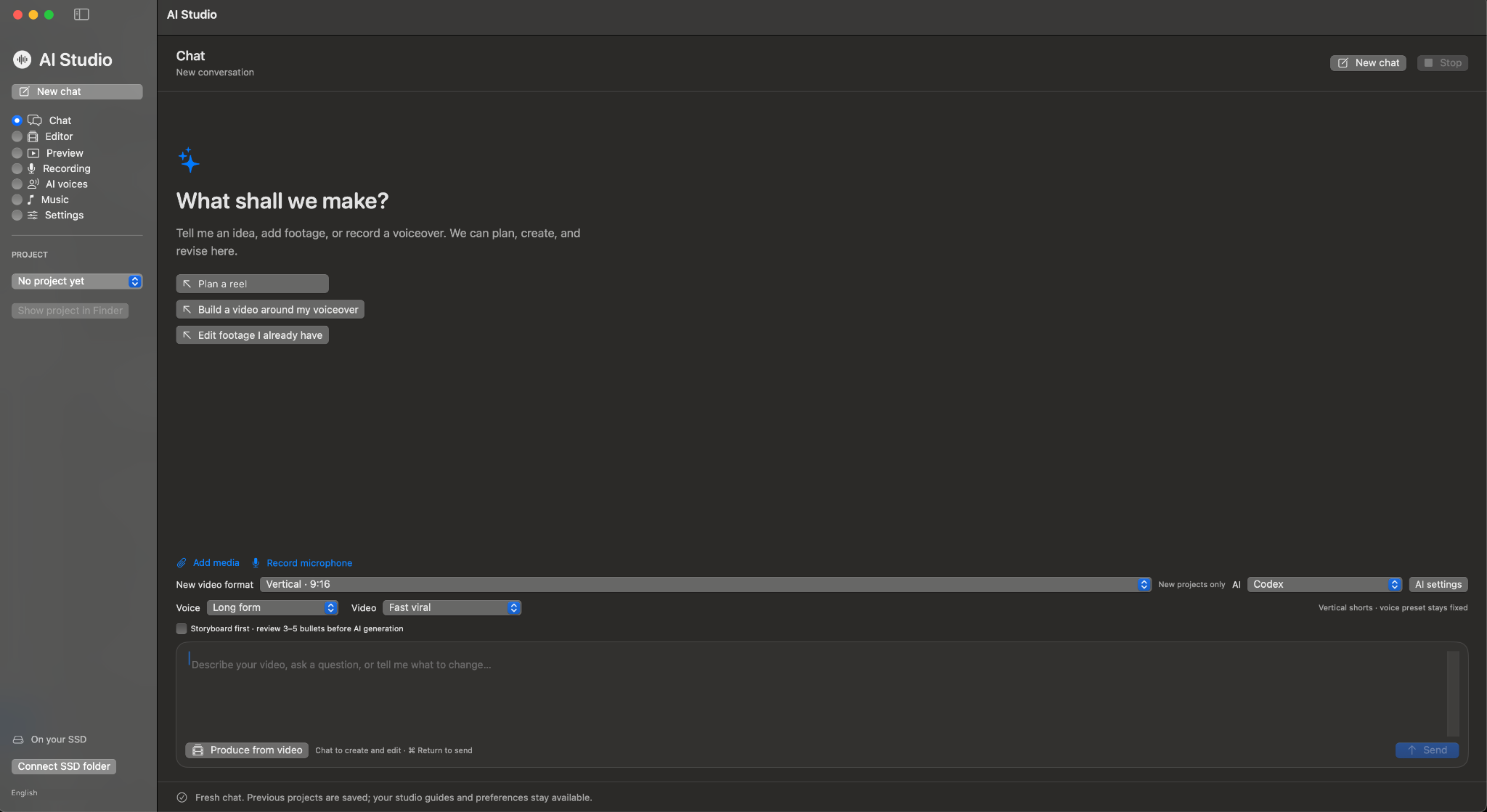
The actual app. Your production workspace.
CHOOSE YOUR AGENT
Switch agents without entering an API key. Keep working on the video with the agent you choose.
FROM THE BRIEF TO THE RENDER
Generate motion graphics for the point you need to make. Give an idea movement, bring emphasis to a key moment and build visuals around the story.
Produce AI narration for a quick clip or a longer video. Have a voiceover of your own? Record it or bring it into the production.
Build a vertical short or give the subject a longer run. AI Studio produces both short-form and long-form content, so the format can follow the idea.
Use your own footage, add a voiceover and shape the sequence around what the viewer needs to understand.
THE OPENING HAS A JOB
The hook and storytelling guidance are part of the production workflow. Start with what the viewer needs to know, give them a reason to stay and build toward a payoff.
Bring the audience, the point and the proof. The guidance helps shape the opening and the story while you make the video.
FINISH THE PRODUCTION
Ask for a change in chat. Open the editor when you want direct control. Preview the production, then render the finished video on your Mac.
AI Studio brings generation and the edit into the same production flow. The point is the video you can use at the end.
Explore AI Studio for MacAI STUDIO / MAC RELEASE
Get release details, pricing and access to buy AI Studio.
Join the waitlistFree to join. No payment taken.
A FEW DETAILS
AI Studio can produce short-form and long-form videos, generate motion graphics, create AI narration and render the finished video on your Mac.
Yes. You can switch between agents including Gemini, Claude and Codex without entering an API key in AI Studio. Access and usage limits depend on your chosen AI service.
Yes. Add existing footage or record a voiceover. You can also use AI narration, then review the production in the editor and preview.
Yes. Hook material and storytelling guidance are built into the production workflow, so the opening and structure can be considered while the video is being made.
Join the purchase waitlist. We will email pricing, Mac release details and purchase access when it opens. Joining the list is free and takes no payment.